



Samsung Magic Info, the flagship software from the Korean tech giant, has become a go-to solution for managing, distributing, and analyzing content across networks of commercial screens. From luxury boutiques in Paris to international airports and fast-food chains in Tokyo, it provides reliable and flexible performance.
Magic Info (more precisely, MagicINFO™) is Samsung Electronics’ digital signage management suite. The platform allows you to create content, schedule it, distribute it, and monitor all commercial screens from a centralized control point. It works just as well on a single screen as it does across a network of thousands of displays spanning multiple continents.
The core architecture of MagicINFO is built around three interconnected components:
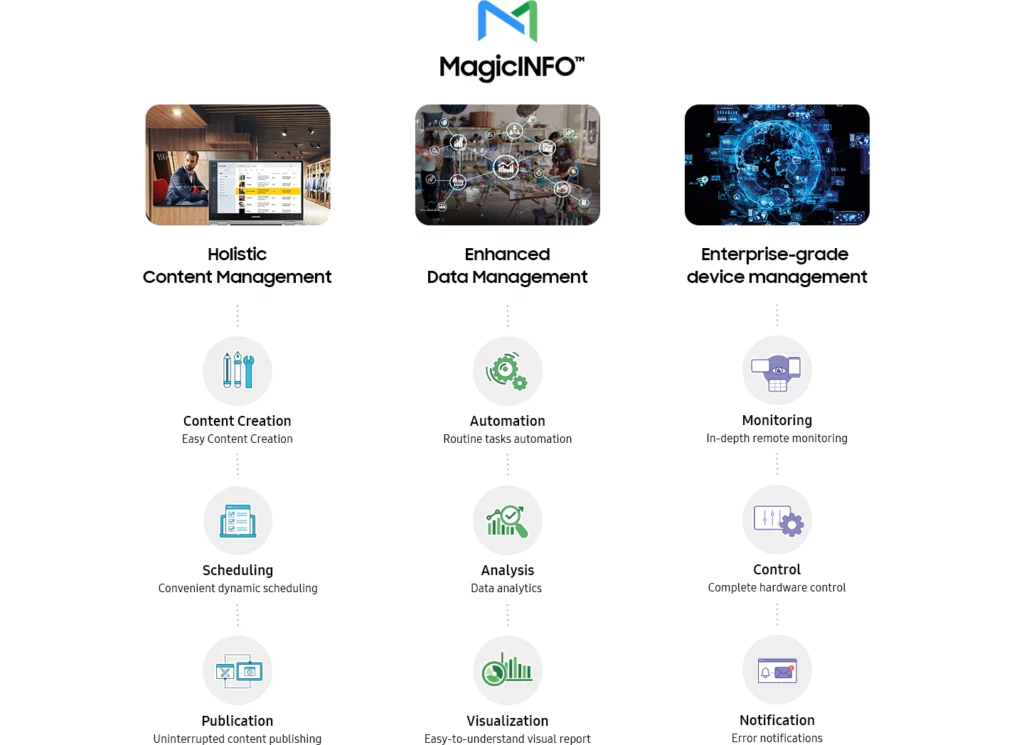
This vertical integration, from software to hardware, is one of Samsung’s strongest commercial advantages over its competitors.
As of 2026, the platform is available in two forms: MagicINFO Server, deployed on a Windows infrastructure managed by the company, and MagicINFO Cloud, a SaaS service hosted on AWS or Azure.
Magic Info’s strength doesn’t rely on a single flashy technology but on the coherence of a well-designed ecosystem. The platform combines tools for content creation, distribution, monitoring, and analysis within an interface that has matured with each release.
Scheduling in Magic Info goes far beyond a simple “Monday 9 a.m. to 6 p.m.” calendar. The platform offers three nested levels of planning:
This third level is particularly useful in environments where critical messages (fire alerts, crisis notifications, last-minute program changes) must appear immediately across the network, no matter what is currently on screen.
Screens can be organized hierarchically by country, region, store type, or zones within a single building. Content changes applied at the group level automatically propagate to all child screens, while each screen can maintain local overrides. This inheritance logic with local override is exactly what multi-site networks need, allowing headquarters to broadcast a common base while each location customizes content as needed.
One often overlooked aspect in digital signage comparisons is how content is delivered to screens. MagicINFO Server uses a differential distribution protocol: only the parts of a file or playlist that have changed are transmitted during an update, rather than the entire content.
On a network of 500 screens receiving a minor template update, the difference in network load between a differential protocol and a full transfer can be 10 to 20 times in data volume.
For deployments with bandwidth constraints (stores in low-coverage areas or shared connections), MagicINFO allows you to set download windows. Screens download updates during off-peak hours, such as overnight, while keeping the previous content until the transfer is fully complete. This ensures no black screens and no visible interruptions for the audience.
One of the most significant advancements in MagicINFO 9 is its ability to link broadcast data with sales data.
By importing point-of-sale reports, the platform can identify which content was displayed in the minutes before a transaction and establish statistical correlations between exposure to a message and the purchase.
For fast-food chains or retail brands, this type of analysis represents a major step forward in justifying investments in digital signage.
Practical tip
To make the most of MagicINFO Insight, it’s recommended to standardize item codes between the point-of-sale system and the platform from the start. This setup step, often overlooked during deployment, is essential for generating accurate content-to-sales correlation reports.
Choosing between an on-premise deployment (local server) and the Cloud version of MagicINFO is often the first strategic decision in a digital signage project.
Both options serve different business needs:
| Criteria | MagicINFO Server (On-premise) | MagicINFO Cloud (SaaS) |
| Initial cost | License + server infrastructure | Annual subscription, no upfront fees |
| Data control | Full control on own infrastructure | Hosted on AWS or Azure |
| IT maintenance | Responsibility of the company | Managed by Samsung NOC |
| Scalability | Limited by infrastructure | Scales on demand |
| 24/7 monitoring | Not included | Proactive Samsung monitoring |
| Ideal for | Large enterprises with internal IT departments | SMEs, franchises, multi-site organizations |
Setting up Samsung Magic Info may seem complex at first, but the platform has made significant strides in usability since its early versions. Here are the main steps in a typical deployment:
Determine the number of screens, their locations, the types of content to display, and user access rights. This planning phase will guide the choice between the Server and Cloud versions.
For the Server version, installation is done on Windows Server. For the Cloud version, simply subscribe through Samsung or an authorized reseller. Technical details are available on the Samsung Business portal.
Each compatible Samsung screen (QB, QH, QBR series, etc.) registers automatically with the MagicINFO Server once connected to the network and configured with the server URL in the screen settings.
Using MagicINFO Author, import media files (videos, images, PDFs, web feeds) and build playlists. Built-in templates allow you to produce professional-looking content quickly, without advanced design skills.
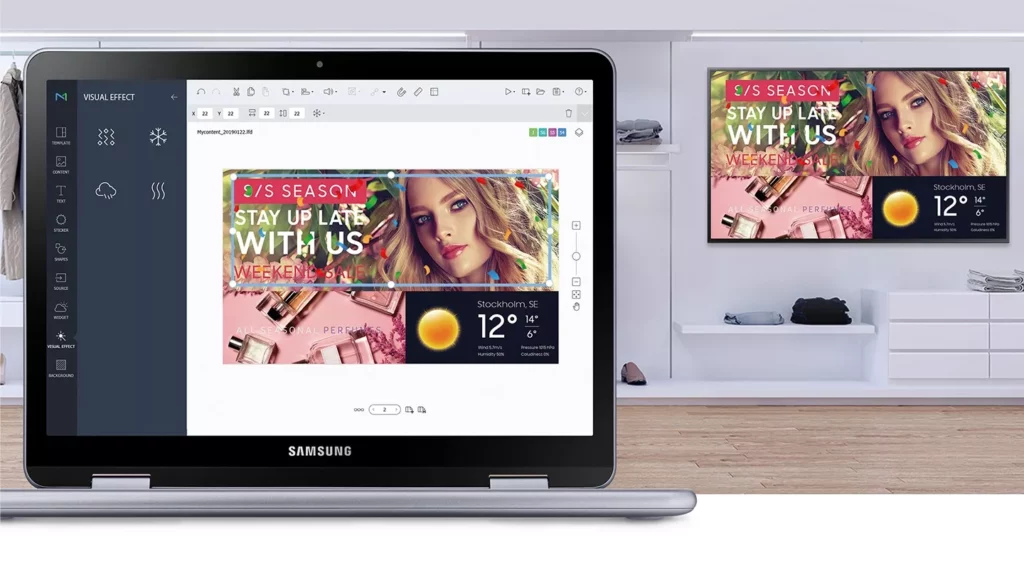
From MagicINFO Server, you can create playback schedules for individual screens, groups, or geographic zones. The monitoring module provides real-time status updates for each display, including power state, current content, temperature, and alerts.
Practical tip
It’s highly recommended to establish a clear naming convention for screens from the start (e.g., PARIS_CHAMPS-ELYSEES_01, LYON_BELLECOUR_B2). A network of 200 poorly named screens can quickly become unmanageable, especially when applying group firmware updates.
Every technology decision requires a clear-eyed view of both the strengths and weaknesses of the chosen product. Magic Info is no exception.
The native integration between Samsung software and hardware is arguably its most decisive advantage. A compatible Samsung screen comes with the MagicINFO player built in, eliminating the need for an external media box and reducing total cost of ownership (TCO).
The platform is highly scalable, capable of managing networks ranging from three screens to several thousand units across multiple continents.
Finally, the solution’s maturity – over 17 years on the market – ensures stability and a well-established ecosystem of reseller partners.
The main criticism of MagicINFO is vendor lock-in. The platform is optimized for Samsung screens, and its advanced features are fully available only on Samsung hardware. Companies wanting to use displays from multiple brands may need to compromise on functionality.
Notable alternatives include brand-agnostic solutions like Scala, Signagelive, and Broadsign, which support multi-brand hardware. LG also offers a comparable platform with LG Business Cloud, launched in 2024. For companies seeking complete flexibility in their display hardware, these options should be evaluated alongside MagicINFO.
No, MagicINFO is not a free solution. The Server version requires purchasing a license, with pricing based on the number of screens and enabled features. The Cloud version operates on an all-inclusive annual subscription. Some commercial Samsung screens include a basic MagicINFO license in their purchase price. It’s recommended to contact an authorized Samsung integrator, such as Motilde, for a quote tailored to your project.
MagicINFO Cloud offers server-free access, lowering the entry barrier. However, for networks with fewer than ten screens, lighter solutions like Screenly, Yodeck, or OptiSigns often provide a better feature-to-cost ratio. MagicINFO shows its full potential starting at around fifteen Samsung screens, thanks to its group management, advanced scheduling, and analytics capabilities. Below that number, the complexity may not be justified.
Yes. MagicINFO supports web content playback via an integrated browser. The platform also provides a W Player API, enabling developers to create rich web applications for digital signage. This allows live dashboards, news feeds, stock tickers, or any other dynamic web content to be integrated directly into MagicINFO playlists.
MagicINFO is the first digital signage solution certified for both ISO 27001 (information security) and ISO 27701 (personal data protection). These certifications cover content management processes, prevention of unauthorized access, and protection of personal data processed in signage campaigns. Samsung also recommends keeping installations up to date and isolating the display network from the company’s main IT systems.
By Q2 2025, Samsung had reached a record 38.8% global market share in commercial displays, maintaining its leadership position for the 17th consecutive year. This dominance reflects how deeply MagicINFO has become embedded in professional digital signage practices.
With the digital signage market projected to reach $48.95 billion by 2033, MagicINFO is well positioned to support this growth.
That said, any successful implementation depends on careful planning, team training, and a preventive maintenance strategy. Even the best software delivers results only if the content it distributes is relevant, up to date, and actually seen by the target audience. Ultimately, it is this editorial dimension – not just the technical features – that determines whether a digital signage network transforms a company’s communication or merely exists as another screen.