



Last update: 09/08/26
A meeting table is rarely chosen at the right moment. People start thinking about it after an office move, after buying an interactive screen too large for the existing furniture, or after watching three people squeeze onto one side of the table for lack of space.
Yet this piece of furniture directly shapes how a team collaborates, exchanges ideas, and makes decisions. Its shape, dimensions, and compatibility with video conferencing tools matter just as much as its looks when it comes to a successful room design project.
This guide breaks down what to consider before buying, from the formats available to the technical constraints imposed by hybrid work, along with ergonomics and budget.
A poorly equipped meeting room costs money, even if the bill never shows it directly. The minutes lost rearranging chairs, hunting for an outlet, or repositioning a laptop so it picks up the microphone add up week after week. A study by Owl Labs on hybrid work in France shows that employees lose an average of five minutes at the start of every hybrid meeting, and that 18% of them regularly spend more than ten minutes on technical setup.
The meeting table isn’t solely responsible for this wasted time, but it’s often where the problem starts. A tabletop too small to hold a touchscreen, no cable routing, or a format that doesn’t fit the number of attendees turns a ten-minute meeting into a logistical negotiation. A table designed around the room’s actual use, on the other hand, makes every exchange run more smoothly, whether it’s an internal discussion or a call with a remote client.
The choice of furniture also shapes how visitors perceive a company. A well-thought-out meeting room, where technology stays out of the way and everyone naturally finds their spot, signals professionalism before the conversation even begins.
The first question to settle is seating capacity. A room meant for team check-ins of four to six people doesn’t need a twelve-seat table that will sit empty nine times out of ten. On the flip side, undersizing a table used for monthly steering committees means borrowing chairs and improvising every session.
It helps to distinguish standard capacity, the one used day to day, from maximum capacity, called on occasionally for larger meetings. Some companies opt for two rooms of different sizes rather than one permanently oversized room. Others prefer a modular table that can expand or split depending on the need at hand.
A room dedicated to creative sessions doesn’t call for the same furniture as a leadership committee room. Brainstorming sessions benefit from mobile tables that are easy to rearrange into clusters or an open layout. Governance meetings, on the other hand, favor a substantial, stable table that structures turn-taking and naturally establishes a hierarchy in the discussion.
Hybrid rooms, increasingly common since remote work became widespread, add another requirement: every participant needs to stay visible and audible to people joining remotely. This often steers the choice toward more compact formats, where the distance between attendees and the camera stays reasonable.
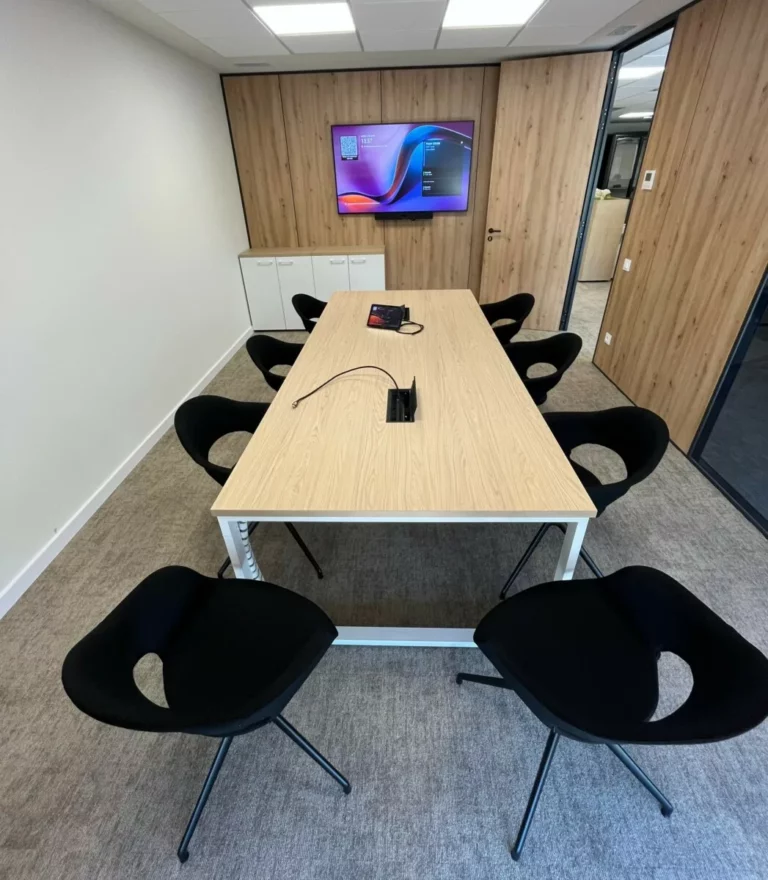
This is the most common format, suited to classic meeting rooms and leadership committees. Its shape naturally structures the hierarchy of the discussion and makes it easy to add extensions for larger gatherings. Its main drawback: people seated at the ends can feel disconnected from the conversation at the center, a flaw made worse in video conferencing if the camera is poorly positioned.
A friendlier variation on the rectangular table, the oval shape removes sharp corners and fosters a sense of equality among participants. It works well for meetings of ten to fourteen people where encouraging everyone to speak up matters, without giving up a certain level of formality.
Ideal for small groups and informal discussions, the round table erases any notion of a hierarchical seat. It’s particularly well suited to small committee meetings or client conversations aimed at building trust. Its limitation is purely geometric: beyond eight to ten people, it becomes hard to work with in a standard-sized room.
Built from independent modules, these tables can be assembled and separated as needed. They’re a great fit for multi-use spaces, where the same room hosts a creative workshop one day, a training session the next, and a regular team meeting after that. The bench format, longer and narrower, works well in coworking spaces and collaborative areas shared between several teams.
In short:
| Format | Ideal capacity | Main use | Watch out for |
|---|---|---|---|
| Rectangular | 6 to 20 people | Committees, formal meetings | Ends sit far from the camera |
| Oval | 8 to 14 people | Collaborative meetings | Takes up more floor space |
| Round | 4 to 8 people | Small committees, interviews | Limited capacity |
| Modular / bench | Variable | Multi-use spaces, coworking | Requires reconfiguration time |
Now that video conferencing has become the norm rather than the exception, a meeting table can no longer be designed independently of the audiovisual equipment around it. Three technical elements need to be planned for from the moment the furniture is chosen: cable management, built-in power, and the camera’s field of view.
A table fitted with cable channels or access panels avoids the tangle of cables trailing across the floor, a common cause of trip hazards and equipment failures. The most well-designed models include built-in power modules, with USB-C and HDMI ports accessible right from the tabletop, removing the need for extension cords thrown together at the last minute.
Integrators specializing in collaborative room equipment, drawing on the kind of expertise Motilde brings to these projects, generally recommend sizing the table around the actual field of view of the installed camera, rather than the other way around. This approach avoids having to rewire or reposition equipment later on.
Choosing materials goes beyond looks alone. A solid wood or high-pressure laminate tabletop holds up better to heavy daily use than a low-end laminate, which scratches and dulls after just a few months. Matte finishes also cut down on distracting screen glare, a detail that matters during long video calls.
Environmental sustainability also factors into today’s selection criteria. Certifications like PEFC for wood or NF Environnement for furniture as a whole guarantee responsibly sourced materials and a well-controlled manufacturing process. This criterion, long treated as secondary, is now carrying real weight in tenders and in the purchasing policies of companies focused on their carbon footprint.
Finally, base structure strength deserves close attention. A heavy tabletop on an undersized frame eventually warps or becomes unstable, especially with modular tables that get assembled and taken apart regularly. Reinforced metal bases built for intensive professional use are a better bet than structures designed for occasional home use.
A meeting table’s ergonomics go beyond its height. They cover the space available per person, the depth of the tabletop, and legroom underneath. The NF EN 527-1 standard, which governs office furniture dimensions, sets a standard height of around 72 cm, a benchmark that also applies to meeting tables used with laptops.
The Institut national de recherche et de sécurité (INRS) also recommends leaving a minimum amount of clearance around furniture, generally 80 cm for one person to walk past. This requirement, often overlooked when laying out a meeting room, prevents situations where everyone has to stand up one after another to let a latecomer through.
The comfort of the chairs paired with the table plays just as important a role. A Gensler study from 2025 found that 68% of employees report feeling more engaged in meetings when the chairs are adjustable and offer proper lower back support. This figure confirms that the table can’t be considered in isolation: the whole setup, from chair to tabletop, works together as a system that supports focus.
Prices vary widely depending on size, materials, and built-in features. A simple table for six people, with no special technology integration, typically runs between 400 and 1,200 euros. Models with cable management and built-in outlets tend to start around 1,500 euros and can exceed 5,000 euros for large, fully equipped committee tables.
Focusing only on the purchase price can lead to regrets. A low-end table that needs replacing after three years often ends up costing more over time than a sturdy model that lasts ten. It’s more useful to weigh the total cost of ownership, factoring in expected lifespan, maintenance costs, and compatibility with future technology upgrades.
Some companies also choose to stagger their investments: outfitting the most-used rooms with premium furniture first, and reserving more budget-friendly options for occasional spaces. This tiered approach helps stretch the overall budget without compromising on quality where it matters most.
For six people, a rectangular or oval table around 2.4 to 3 meters long and 1.1 to 1.2 meters wide offers comfortable space. Plan for about 60 cm of width per person to ensure good posture and easy access to power outlets.
Manufacturers now offer retractable access panels and discreet cable channels built directly into the tabletop. These solutions keep cables out of sight when not in use while still allowing quick access to outlets during meetings.
Yes, since in a small company the same room often serves several purposes. Modularity makes it possible to adapt the setup based on the number of participants or the type of meeting, without needing separate dedicated spaces.
Choosing a meeting table means weighing several factors: seating capacity, the type of discussions held, technology integration, and available budget. No single format beats all the others; each one suits a specific use, whether that’s a leadership committee, a creative session, or a hybrid team check-in. The real key is planning ahead: treating furniture and audiovisual equipment as one coherent package, rather than two purchases made at different times.
The coming years should push this integration even further. As meeting rooms adopt smart cameras, voice-tracking microphones, and increasingly interactive screens, furniture will need to keep pace, with tables designed from the outset to support this technology rather than work around it. Companies that plan for this shift now will save themselves costly renovations later.